이전 개발 보러 가기
https://taetae99.tistory.com/40
[Board] 벡엔드 토이 프로젝트 - 게시판 페이징 구현 (9)
이전 개발 보러 가기https://taetae99.tistory.com/39 [Board] 벡앤드 토이 프로젝트 - 게시글 수정, 삭제 기능 개발 (8)이전 개발 보러 가기https://taetae99.tistory.com/38 [Board] 벡엔드 토이 프로젝트 - 게시글 생
taetae99.tistory.com
목차
0. 댓글 수정을 어떻게 구현할 것인가?
댓글을 수정하는 부분에서 어려움을 겪었다.
구현하고자 한 댓글의 수정은 아래의 캡처화면에서 보는 것과 같이 게시글에 작성된 댓글 중 수정을 원하는 댓글의 우측 상단 드롭다운의 수정 버튼을 누르면 댓글이 <textArea>로 변경되어 데이터의 값을 수정할 수 있도록 하고자 했다.
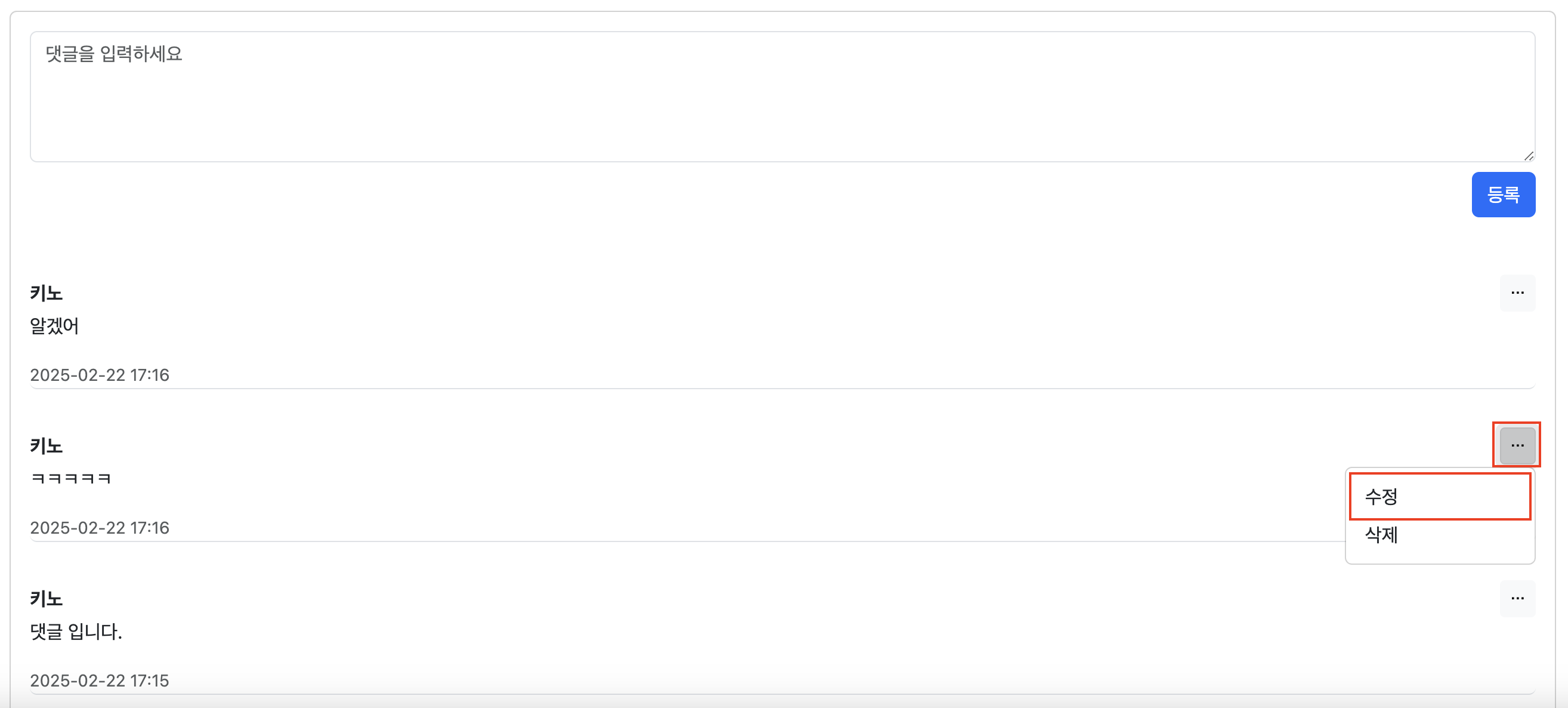

검색을 통해 댓글 수정에 대한 내용을 확인해 보면 대부분 ajax를 활용한 비동기 방식을 사용하여 댓글 수정을 처리한다.
하지만 내가 구상했던 프로젝트와는 거리가 있어 동기 방식으로 해결해보고 싶었다.
여러 가지 삽질했던 내용을 공유하고자 한다.
처음 댓글 수정을 처리하기 위해 시도했던 방법은 [게시글 상세 보기 페이지]와 [게시글 상세 보기 + 댓글 수정 페이지]로 구분하여 두 개의 html 파일을 작성하는 방식을 생각했다.
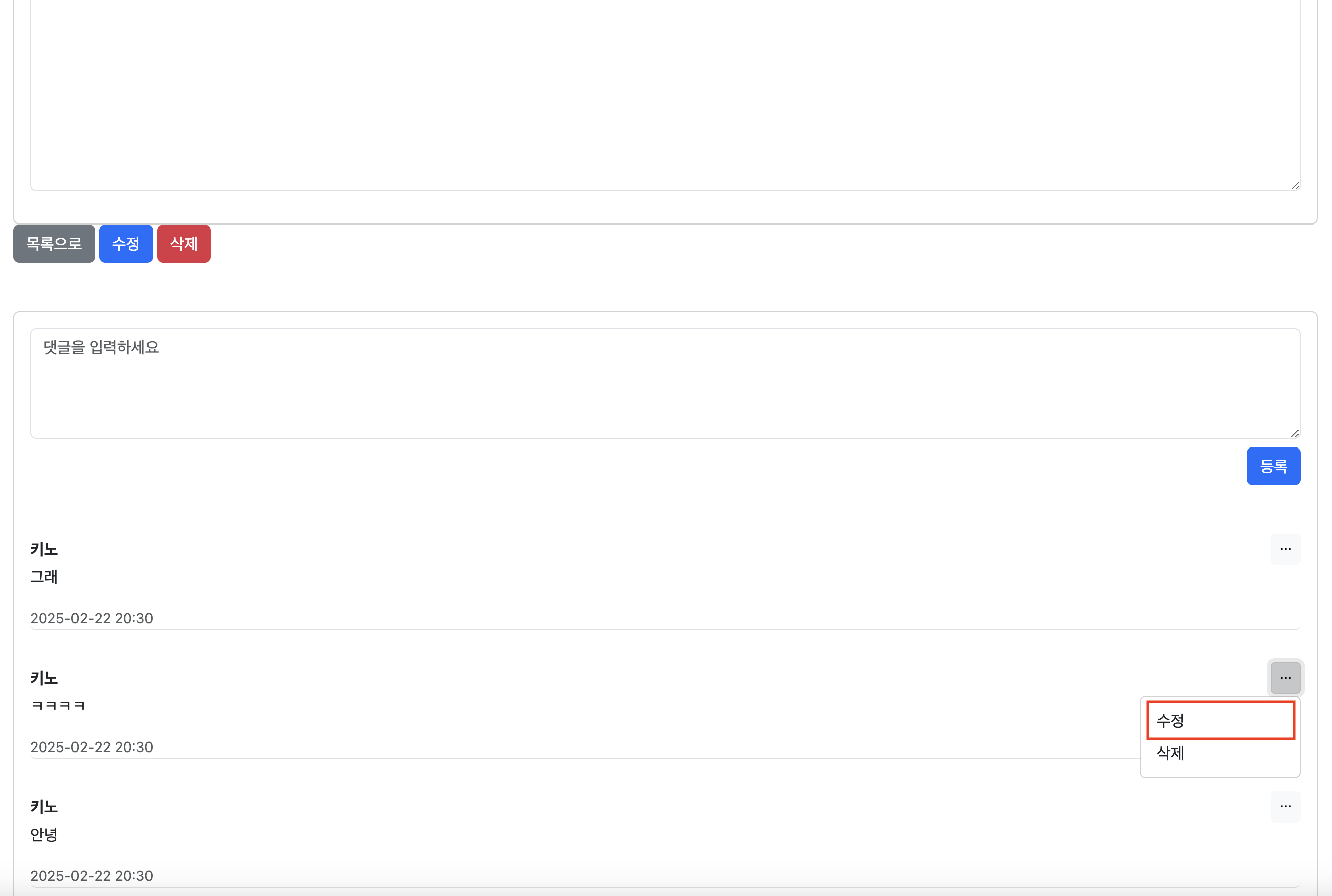
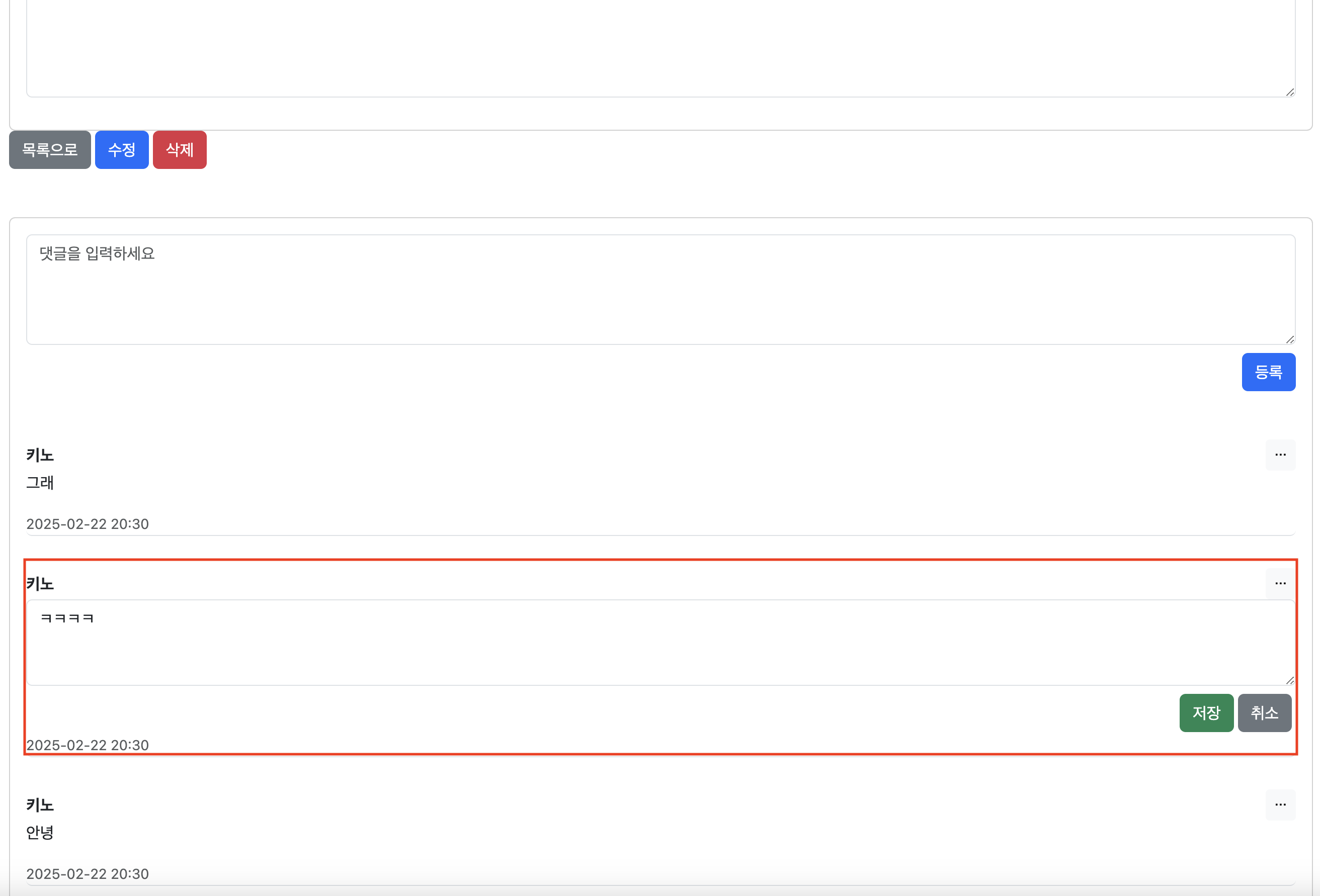
[게시글 상세 보기] 뷰에서 수정 버튼을 누르면 [게시글 상세 보기 + 댓글 수정 페이지] 뷰를 렌더링 하고 이때 댓글 부분만 textArea로 변경했다.
하지만 이와 같이 두 개의 html을 사용하는 방식을 설계하고 테스트를 진행하는 도중 이 방식이 잘못되었다는 생각이 들었다.
만약 UI에 수정이 생긴다면 2개의 html파일의 수정이 필요한데.. 유지보수 어떻게 해??
이와 같은 이유로 다른 방안을 찾아봤다.
대안으로 선택한 댓글 수정을 구현한 방식은 다음과 같다.
댓글 생성, 댓글 수정을 위한 객체를 별도로 구성하고 매핑한다.
수정 요청이 들어오면 기존 게시글 상세 보기 페이지를 다시 렌더링 하고 추가적으로 model에 targetId 값을 설정하고 전달한다. 이때 targetId는 수정을 하고자 하는 댓글의 id이다.
이후 해당 targetId를 사용하여 수정할 댓글을 특정하고 렌더링 하여 보여준다.
1. 댓글 생성, 댓글 수정 객체 분리하기
댓글 작성과 수정을 위한 객체를 분리하는 이유는 @Valid를 통한 유효성 검사를 처리하기 위해서이다.

파란색 칸은 댓글을 작성하기 위한 form으로 CommentForm과 매핑된다.
빨간색 칸은 댓글 수정을 위한 form으로 CommentEditForm과 매핑된다.
1-1. CommentForm (댓글 작성)
@Getter
public class CommentForm {
    @NotEmpty
    @Size(max = 100)
    private String comment;


    private CommentForm(String comment) {
        this.comment = comment;
    }

    public static CommentForm create(String comment) {
        return new CommentForm(comment);
    }
}
1-2. CommentEditForm (댓글 수정)
@Getter
public class CommentEditForm {

    @NotEmpty
    @Size(max = 100)
    private String comment;

    private CommentEditForm(String comment) {
        this.comment = comment;
    }

    public static CommentEditForm create(String comment){
        return new CommentEditForm(comment);
    }
}
2. CommentController
@Controller
@RequiredArgsConstructor
public class CommentController {

    private final CommentService commentService;
    private final PostService postService;

    //댓글 수정 폼 가져오기
    @GetMapping("/board/post/{postId}/comment/{commentId}")
    public String editForm(@PathVariable Long postId,@PathVariable Long commentId,
                           @ModelAttribute CommentForm commentForm,
                           Model model){

        Comments comment = commentService.findById(commentId);

        loadPostDetails(model, postId);
        model.addAttribute("commentEditForm", CommentEditForm.create(comment.getComment()));

        model.addAttribute("targetId",commentId);

        return "post/postForm";
    }

    //댓글 작성
    @PostMapping("/board/post/{postId}/comment")
    public String create(@AuthenticationPrincipal MemberDetail memberDetail, @PathVariable Long postId,
                         CommentEditForm commentEditForm,
                         @Valid CommentForm commentForm, BindingResult bindingResult, Model model) {

        if (bindingResult.hasErrors()) {
            loadPostDetails(model, postId);
            return "post/postForm";
        }

        commentService.write(postId,memberDetail.getMember().getId(), commentForm.getComment());

        return "redirect:/board/post/" + postId;
    }

    @DeleteMapping("/board/post/{postId}/comment/{commentId}")
    public String delete(@PathVariable Long postId, @PathVariable Long commentId,
                         @AuthenticationPrincipal MemberDetail memberDetail) {
        commentService.deleteComment(commentId, postId, memberDetail.getMember().getId());

        return "redirect:/board/post/" + postId;
    }

    @PostMapping("/board/post/{postId}/comment/{commentId}")
    public String update(@PathVariable Long postId, @PathVariable Long commentId,
                         @AuthenticationPrincipal MemberDetail memberDetail,
                         CommentForm commentForm,
                         @Valid CommentEditForm commentEditForm,
                         BindingResult bindingResult, Model model) {

        if (bindingResult.hasErrors()) {
            loadPostDetails(model, postId);
            model.addAttribute("targetId",commentId);
            return "post/postForm";
        }

        commentService.update(commentId,memberDetail.getMember().getId(),commentEditForm);

        return "redirect:/board/post/" + postId;
    }


    private void loadPostDetails(Model model, Long postId) {
        Post post = postService.viewPost(postId);
        model.addAttribute("post", post);
        List<Comments> comments = commentService.findAllByPostOrderByCreateDate(postId);
        model.addAttribute("comments", comments);
    }

}
- editForm은 수정 버튼을 눌렀을 때 targetId를 model에 설정하고 게시글 상세 보기 페이지(postForm)를 보여준다.
- 이때 댓글 수정을 위한 폼(textArea)에 기존 댓글을 보여주도록 변경 전 댓글 내용을 commentEditForm에 넣는다.
- create는 댓글 작성을 담당한다.
- 댓글 작성을 위한 CommentForm에 대해 @Valid를 통해 유효성 검사를 진행한다.
- delete는 댓글 삭제를 담당한다.
- update는 댓글 수정을 담당한다.
- 수정 시에는 CommentEditForm에 대해 @Valid를 통해 유효성 검사를 진행한다.
3. CommentService
@Service
@Transactional(readOnly = true)
@RequiredArgsConstructor
public class CommentService {

    ...

    @Transactional
    public Long write(Long postId, Long memberId, String comment) {

        Post post = postRepository.findOne(postId);
        Member member = memberRepository.findOne(memberId);

        Comments comments = Comments.createComments(comment, member, post);

        commentRepository.save(comments);
        return comments.getId();
    }
    @Transactional
    public void update(Long postId, Long commentId, Long currentMemberId, CommentEditForm commentEditForm) {

        Post post = postRepository.findOne(postId);
        Comments comment = commentRepository.findById(commentId);
        if (post == null) {
            throw new PostNotFoundException("게시글을 찾을 수 없습니다.");
        }
        if (comment == null) {
            throw new CommentNotFoundException("댓글을 찾을 수 없습니다.");
        }
        if (!comment.getMember().getId().equals(currentMemberId)) {
            throw new UnauthorizedAccessException("댓글 삭제 권한이 없습니다.");
        }
        comment.updateComments(commentEditForm.getComment());
    }

    @Transactional
    public void delete(Long commentId, Long postId, Long currentMemberId) {

        Post post = postRepository.findOne(postId);
        if (post == null) {
            throw new PostNotFoundException("게시글을 찾을 수 없습니다.");
        }
        Comments comment = commentRepository.findById(commentId);
        if (comment == null) {
            throw new CommentNotFoundException("댓글을 찾을 수 없습니다.");
        }
        if (!comment.getMember().getId().equals(currentMemberId)) {
            throw new UnauthorizedAccessException("댓글 삭제 권한이 없습니다.");
        }

        comment.removePost();

        commentRepository.delete(commentId);
    }

	...

}- update는 수정을 담당한다.
- 게시글이 존재하지 않는 경우, 댓글이 존재하지 않는 경우, 댓글 수정에 대한 권한(소유)이 없는 경우에 대하여 예외처리 했다.
- 더티체킹(Dirty checking)을 사용하여 데이터를 변경한다.
- delete는 댓글의 삭제를 담당한다.
- 게시글이 존재하지 않는 경우, 댓글이 존재하지 않는 경우, 댓글 삭제에 대한 권한(소유)이 없는 경우에 대하여 예외처리 했다.
- 댓글 삭제 시에는 removePost를 사용하여 게시글과 댓글 사이의 연관관계를 끊어준다.
4. 게시글 상세 보기 (postForm.html)
 ...
 <div class="card mt-5">
        <form th:action="@{/board/post/{id}/comment(id=${post.id})}" method="post" th:object="${commentForm}" class="card-body mb-3">
            <textarea th:field="*{comment}" class="form-control" rows="4" placeholder="댓글을 입력하세요"
                      th:class="${#fields.hasErrors('comment') ? 'form-control is-invalid':'form-control'}"></textarea>
            <div class="d-flex justify-content-end mt-2">
                <button type="submit" class="btn btn-primary">등록</button>
            </div>
        </form>


        <div th:each="comment : ${comments}" class="card-body">
            <div class="border-bottom rounded">
                <div class="d-flex justify-content-between align-items-center">
                    <div class="d-flex align-items-center">
                        <strong th:text="${comment.member.nickname}"></strong>
                    </div>

                    <!-- Dropdown -->
                    <div class="dropdown" th:if="${#authentication.principal.username == comment.member.email}">
                        <button class="btn btn-sm btn-light" type="button" data-bs-toggle="dropdown" aria-expanded="false">
                            <strong>⋯</strong>
                        </button>
                        <ul class="dropdown-menu dropdown-menu-end">
                            <li>
                                <a type="button" class="dropdown-item"
                                   th:if="${targetId != comment.id}"
                                        th:href="@{/board/post/{postId}/comment/{commentId}(postId=${post.id},commentId=${comment.id})}">
                                    수정
                                </a>
                            </li>
                            <li>
                                <form th:action="@{/board/post/{postId}/comment/{commentId}(postId=${post.id},commentId=${comment.id})}"
                                      th:method="delete" onsubmit="return confirmDelete();">
                                    <button type="submit" class="dropdown-item">삭제</button>
                                </form>
                            </li>
                        </ul>
                    </div>
                </div>

                <p th:text="${comment.comment}"
                   th:style="${targetId != comment.id} ? 'display: block;' : 'display: none;'"></p>


                <form th:action="@{/board/post/{postId}/comment/{commentId}(postId=${post.id},commentId=${comment.id})}"
                      method="post"
                      th:object="${commentEditForm}"
                      th:style="${targetId == comment.id} ? 'display: block;' : 'display: none;'">
                    <textarea class="form-control" rows="3" th:field="*{comment}"
                              th:class="${#fields.hasErrors('comment') ? 'form-control is-invalid':'form-control'}"></textarea>
                    <div class="d-flex justify-content-end mt-2">
                        <button type="submit" class="btn btn-success me-1">저장</button>
                        <a type="button" class="btn btn-secondary me-1" th:href="@{/board/post/{postId}(postId=${post.id})}">취소</a>
                    </div>
                </form>

                <span class="text-muted small" th:text="${#temporals.format(comment.createdDate, 'yyyy-MM-dd HH:mm')}"></span>

            </div>
            </div>
        </div>

    </div>

...
타임리프의 th:if를 사용하여 조건 부로 댓글 수정 폼을 보여준다.
targetId는 서버에서 전송하는 값으로, 수정을 원하는 댓글의 id가 담겨있다.
이 값을 기준으로 targetId와 일치하는 댓글은 수정 폼이 렌더링 되며 일치하지 않는 댓글은 p 태그로 구성된 댓글 내용만 표시된다.
5. 실행 화면
네이버 카페의 구조를 보며 최대한 비슷하게 구현하고 싶었다. 그중에서도 차용하고 싶은 포인트는 크게 세 가지였다.
1. 드롭 다운의 수정 버튼을 눌러 수정 폼이 나타난 댓글은 드롭 다운에서 수정 버튼이 사라진다.
2. 댓글의 수정 폼이 보이는 상황에서 다른 댓글의 수정 버튼을 누르면 기존 버튼의 수정 폼은 사라지고 다른 댓글에만 수정 폼이 나타난다.
3. 댓글 삭제 시에는 확인 창으로 한 번 더 확인한다.
5-1. 댓글 작성

댓글 작성 폼에 댓글을 입력한다.
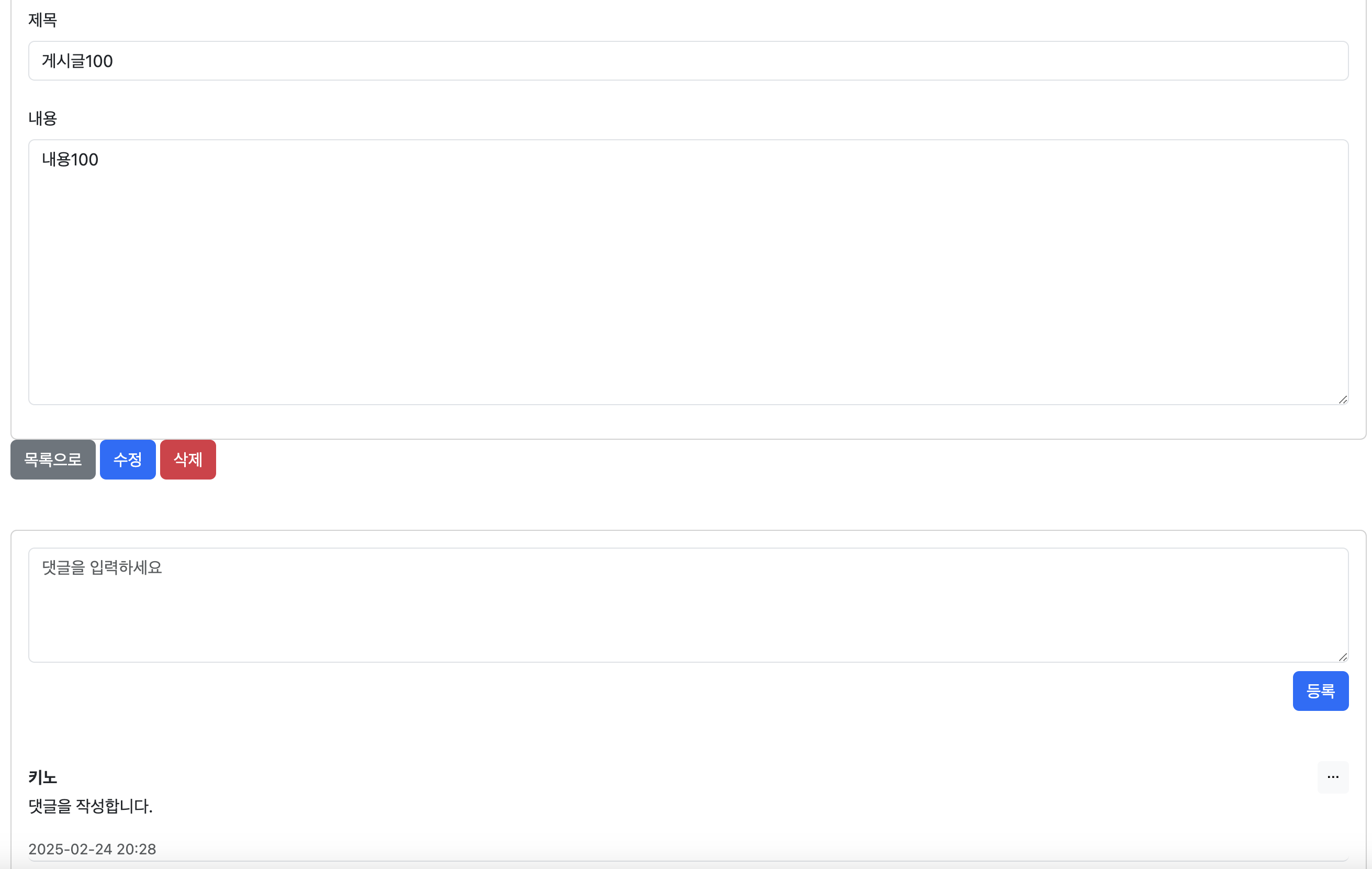
등록 버튼을 눌러 댓글 작성 요청을 보내면 댓글이 성공적으로 작성된다.
5-2. 댓글 작성 유효성 검사
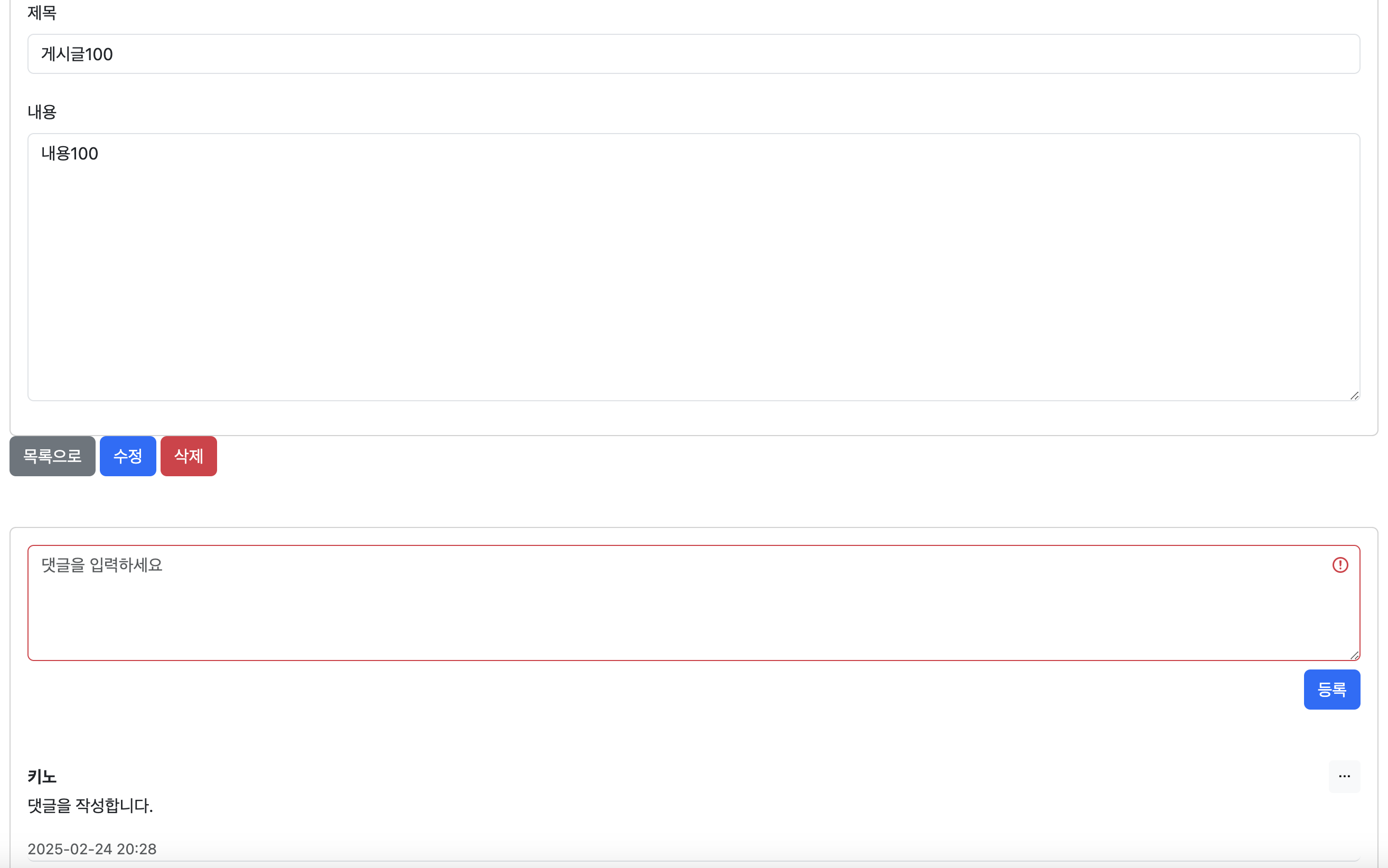
입력 값 없이 등록 버튼을 누르면 @Valid에 의해 CommentForm에 대한 유효성 검사가 실패하고 경고 표시가 나타난다.
5-3. 댓글 수정 폼
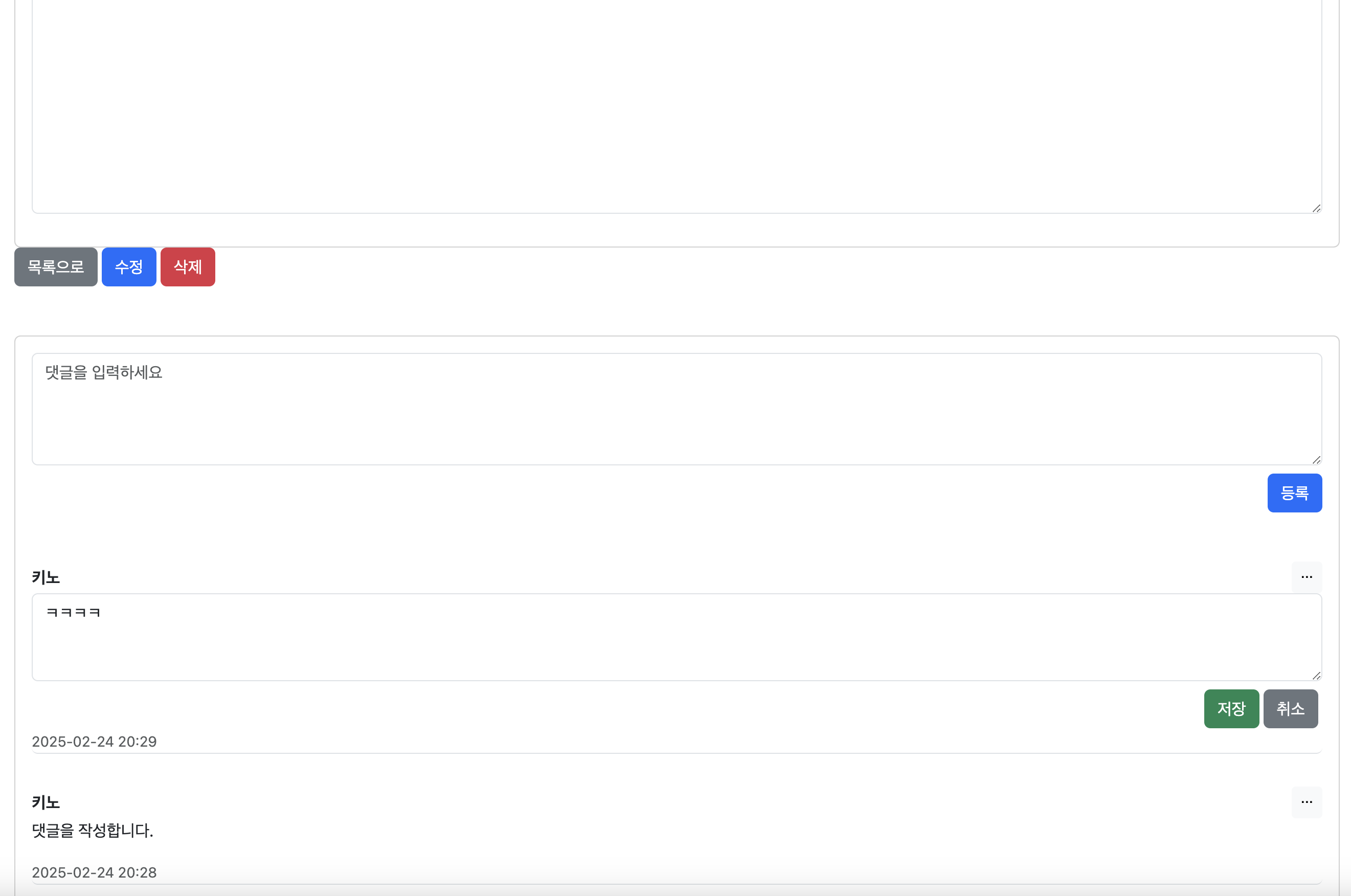
내용이 'ㅋㅋㅋㅋ'인 댓글의 드롭다운 버튼을 눌러 수정 폼이 나타난 모습이다.
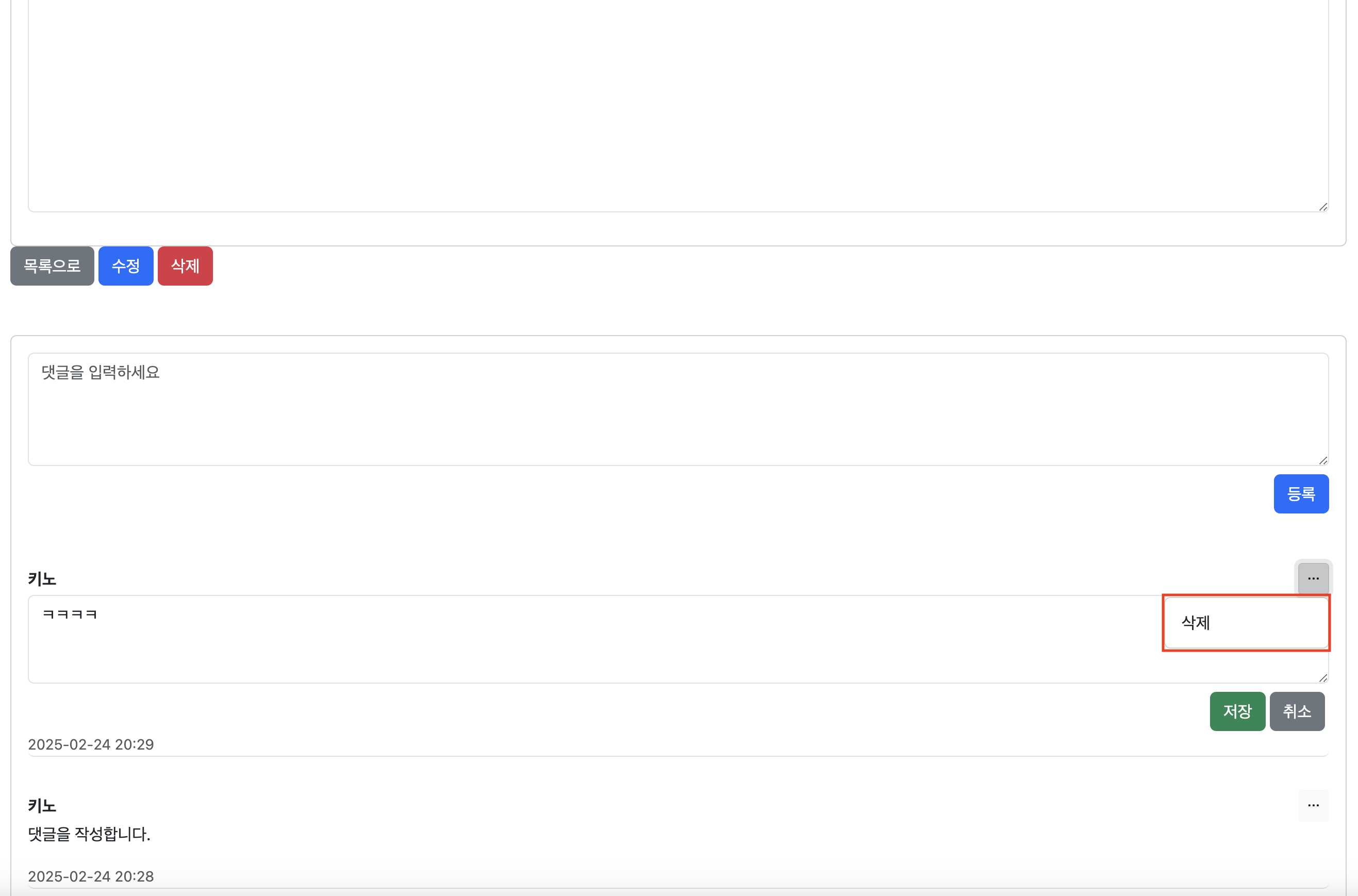
이때 해당 댓글의 드롭다운에 수정 버튼은 사라지고 삭제 버튼만 존재한다.
5-4. 댓글 수정 폼 유효성 검사

수정 폼 또한 @Valid에 의해 CommentEditForm에 대한 유효성 검사가 실패하면 경고 표시가 나타난다.

성공적으로 내용이 변경된 모습이다.
5-5. 댓글 삭제

댓글 삭제 버튼을 누르면 삭제 확인 창으로 한 번 더 확인한다.
'프로젝트 > Board 프로젝트' 카테고리의 다른 글
| [JPA] 게시판 프로젝트 - 마이그레이션 : H2에서 MySQL (11) (1) | 2025.02.28 |
|---|---|
| [JPA] 게시판 프로젝트 - 게시판 페이징 구현 (9) (0) | 2025.02.15 |
| [JPA] 게시판 프로젝트 - 게시글 수정, 삭제 기능 개발 (8) (1) | 2025.02.09 |
| [JPA] 게시판 프로젝트 - 게시글 생성 기능 구현 (7) (4) | 2025.02.03 |